Modern enterprises rely on APIs to connect applications, exchange data, and deliver digital services. As organizations adopt cloud platforms, microservices, mobile applications, and third party integrations, managing these connections securely becomes increasingly complex.Azure API Management (APIM) provides a centralized way to publish, secure, monitor, and manage APIs across an organization's digital ecosystem. It acts as an API gateway between client applications and backend services, allowing teams to enforce access policies, control traffic, monitor performance, and standardize how APIs are consumed.For enterprises building connected applications, Azure API Management helps establish a consistent approach to API security and governance without requiring every backend service to implement the same controls independently.In this guide, we explore how Azure API Management works, its key capabilities, its role in enterprise integration, and the best practices organizations should follow when implementing it.
What Is an API and Why Do Enterprises Need Centralized API Management?
An Application Programming Interface (API) enables two software systems to communicate through a defined set of rules. One application sends a request, and another system processes it and returns a response.For example, when a customer checks an order status, the frontend application may call an API that retrieves shipping information from a backend service. Similarly, a healthcare application might use APIs to retrieve appointment availability, exchange patient information, or connect with external systems.As enterprises expand, they often manage dozens or hundreds of APIs across cloud environments, internal applications, and third party platforms.Managing these APIs independently can introduce several challenges:
Fragmented security: Different teams may implement authentication and authorization inconsistently.
Limited visibility: Monitoring API usage, errors, and response times across multiple services becomes difficult.
Uncontrolled traffic: Unexpected request volumes can affect backend performance and availability.
Complex integrations: Each new application or partner may require additional integration work.
Inconsistent governance: API standards, access policies, and versioning practices may differ across teams.
Centralized API management addresses these challenges by providing a common layer for publishing, protecting, and monitoring APIs.
What Is Azure API Management (APIM)?
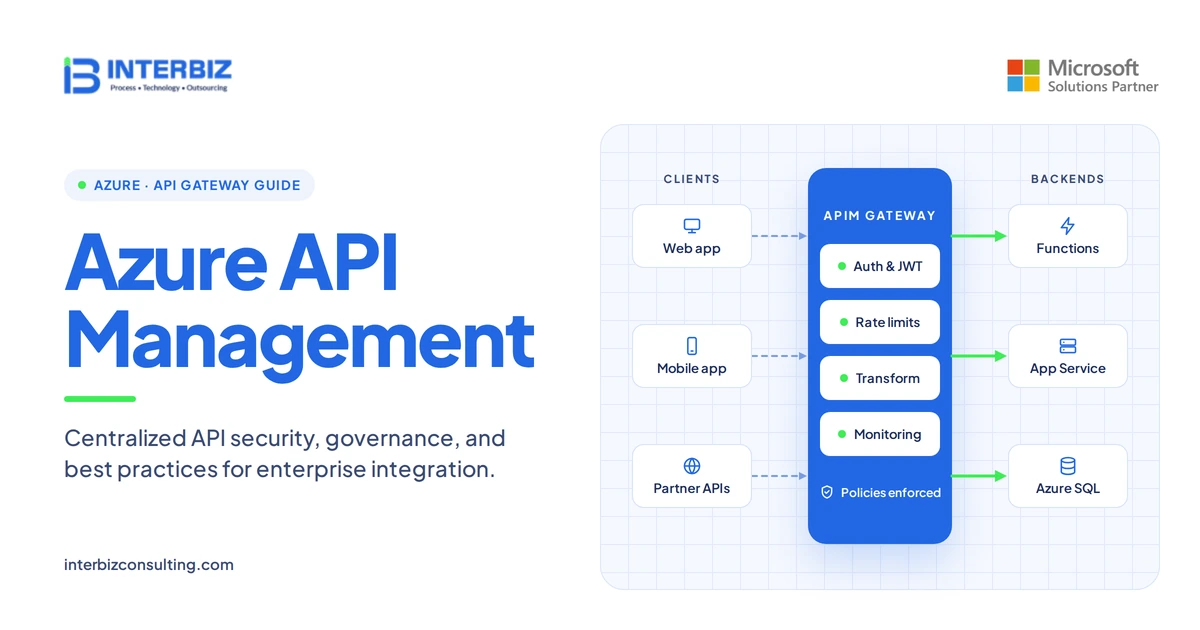
Azure API Management is a managed Microsoft Azure service that helps organizations expose, secure, govern, and monitor APIs through a centralized management platform.It places an API gateway between client applications and backend services. Instead of allowing clients to connect directly to every backend endpoint, organizations can route requests through the gateway and apply consistent policies.Azure API Management includes three primary components.API gateway: Receives API requests, applies configured policies, and forwards requests to the appropriate backend service.Management plane: Provides tools to configure APIs, products, policies, access permissions, and other API management settings.Developer portal: Offers a customizable portal where developers can discover APIs, review documentation, and access onboarding resources according to their permissions.These components help organizations manage the API lifecycle, from publication and access control to monitoring and ongoing maintenance.
How Does Azure API Management Work?
Azure API Management processes requests through a structured workflow that connects client applications with backend services.
Client Sends an API Request
A web application, mobile application, or external system sends a request to an API endpoint exposed through Azure API Management.
The Gateway Applies Inbound Policies
The gateway executes configured policies to validate requests, check credentials, enforce rate limits, inspect headers, or transform request data.The specific checks depend on the organization's security requirements and policy configuration.
The Request Reaches the Backend
After the configured processing is complete, APIM forwards the request to the designated backend, such as an Azure Function, Azure App Service, or another accessible service.The backend executes the required business logic and generates a response.
APIM Processes the Response
Outbound policies can transform response formats, modify headers, or remove information that should not be exposed to clients.
The Client Receives the Response
The gateway returns the processed response to the requesting application.This workflow provides a centralized place to apply API policies while allowing backend services to focus on their core business responsibilities.
Key Features of Azure API Management
Centralized API Security
Azure API Management supports security controls that help organizations manage access to APIs consistently.Depending on the architecture, teams can configure Microsoft Entra ID integration, validate JSON Web Tokens (JWTs), enforce subscription requirements, restrict access by IP address, and apply other gateway policies.These controls help reduce the risk of unauthorized API access.However, API gateway security should complement rather than replace backend authentication, authorization, network controls, and secure application design.
API Rate Limiting and Throttling
Rate limiting and throttling help control how frequently clients can call an API.For example, an organization might restrict an application to a defined number of requests within a specified period. If the client exceeds the configured limit, APIM can reject additional requests according to the applicable policy.These controls can help protect backend resources from accidental traffic spikes and excessive usage.Rate limiting is not, by itself, a complete defense against distributed denial of service attacks. Organizations should also evaluate appropriate Azure network security and DDoS protection measures.
Request and Response Transformation
APIM policies can modify requests and responses without requiring changes to backend application code.Examples include:
Adding, removing, or updating HTTP headers.
Rewriting request URLs.
Transforming supported payload formats.
Removing selected response fields.
Setting standardized response headers.
These capabilities help maintain consistent API contracts when integrating applications with different technical requirements.
API Monitoring and Analytics
Organizations need visibility into how APIs perform under real world conditions.Azure API Management can provide API usage and diagnostic information through its monitoring capabilities and integrations with Azure Monitor and Application Insights, depending on the configuration.Teams can investigate request volumes, response latency, failures, and other operational signals to identify issues and improve reliability.Logging should be configured carefully to avoid unnecessarily capturing credentials, personal information, or other sensitive data.
API Products and Developer Onboarding
APIM supports grouping APIs into products with defined access and subscription requirements.The developer portal can help internal developers and external partners discover available APIs, understand usage requirements, and access documentation.This approach makes it easier to establish consistent onboarding processes and manage API access across teams and business partners.
Why Azure API Management Matters for Enterprise Integration
Enterprise environments rarely operate on a single application or technology platform. They often combine cloud services, legacy applications, databases, third party platforms, and specialized business systems.Azure API Management helps create a consistent access layer across these environments.Its key benefits include:Improved API governance: Apply shared standards for authentication, traffic control, versioning, and API publication.Stronger access management: Centralize gateway level checks and integrate with enterprise identity systems.Better backend protection: Reduce direct exposure of backend endpoints and control the requests forwarded to them.Greater operational visibility: Collect diagnostic information and identify API performance issues.Simplified partner integrations: Provide standardized API access and documentation for authorized external consumers.More maintainable architectures: Separate gateway level concerns from core business logic, making API management easier to maintain as systems evolve.The actual benefits depend on the architecture, policy design, monitoring configuration, and operational practices used during implementation.
Azure API Management in Practice: The RoviCare Project
Healthcare platforms often connect multiple applications, provider networks, and backend services. Managing these integrations requires a consistent approach to API security, access control, and communication between systems.RoviCare is a healthcare referral and care coordination platform built on Microsoft Azure. Its technology stack includes Azure API Management alongside services such as Azure Functions, Azure App Service, and Azure SQL Database. These components support the platform's connected application architecture.Within this environment, Azure API Management provides a centralized layer for managing API interactions and applying configured gateway policies. This helps support structured communication between applications and backend services while maintaining consistent API management practices.For healthcare technology organizations building connected, cloud based platforms, RoviCare illustrates how Azure services can support application integration.Know More About RoviCareExplore the RoviCare case study to learn more about Interbiz Consulting's healthcare technology experience and Azure based solutions.
Azure API Management Best Practices
A successful APIM implementation requires more than routing requests through a gateway. Organizations should establish clear security, governance, and operational practices.
Configure Authentication and Authorization
Use appropriate authentication and authorization mechanisms for every exposed API.For protected enterprise APIs, consider Microsoft Entra ID integration and JWT validation where appropriate. Validate that the identity, audience, issuer, and permissions match the API's requirements.Do not treat subscription keys as a complete replacement for strong authentication and authorization.
Apply Rate Limits Based on Business Requirements
Set traffic limits according to the expected usage patterns of each API and the capacity of its backend.Consider different requirements for internal applications, public APIs, and partner integrations. Test policies under realistic traffic conditions before deploying them to production.
Protect Backend Endpoints
Where the architecture permits, restrict direct access to backend services so that clients cannot bypass gateway policies.Use appropriate network restrictions, private connectivity, managed identities, or other supported security mechanisms based on the environment.The backend should still validate access and enforce its own security requirements.
Monitor API Performance Regularly
Review request volumes, latency, error rates, and failed requests.Configure alerts for relevant operational thresholds and investigate recurring failures. Make sure diagnostic settings meet security, retention, and compliance requirements.
Keep API Policies Maintainable
Use reusable policy fragments and shared configuration patterns where appropriate.Avoid duplicating complex policy logic across multiple APIs. Review the impact of transformations and additional policy processing on response times.Test changes in a nonproduction environment before releasing them.
Establish API Versioning and Lifecycle Governance
Define standards for API naming, documentation, versioning, deprecation, and retirement.Communicate changes to API consumers and provide appropriate migration timelines. A structured lifecycle process helps prevent broken integrations when APIs evolve.
Review Cost and Capacity Requirements
Evaluate the APIM tier, capacity, networking requirements, availability expectations, and expected request volumes before deployment.Review the current Azure pricing and feature documentation when selecting a service tier. Requirements differ across architectures, and some capabilities are available only in specific configurations.
Common Azure API Management Mistakes to Avoid
Even with a centralized gateway, poor configuration can introduce security and operational risks.Mistake 1: Assuming the gateway secures everything. APIM policies must be configured correctly, and backend services still need appropriate protection.Mistake 2: Using subscription keys as the only security control. Subscription keys help identify and control API consumption, but sensitive APIs may require stronger identity based authentication and authorization.Mistake 3: Ignoring backend exposure. If a backend remains directly accessible, clients may bypass gateway policies unless other controls prevent it.Mistake 4: Overlooking monitoring and diagnostics. Without useful telemetry and alerts, teams may discover performance or security issues too late.Mistake 5: Applying excessive policy logic. Unnecessary transformations and complex policies can increase latency and make troubleshooting harder.Mistake 6: Neglecting API lifecycle management. Poor versioning and deprecation practices can disrupt applications and partner integrations.Addressing these issues early helps organizations build a more reliable and maintainable API management environment.
Conclusion: Build a More Secure API Architecture with Azure API Management
Azure API Management provides enterprises with a centralized platform for managing API access, enforcing gateway policies, controlling traffic, and improving operational visibility.By combining appropriate authentication, backend protection, monitoring, and API lifecycle governance, organizations can build more secure and maintainable integration architectures.The key is to treat APIM as part of a broader API security strategy, supported by well designed policies and properly protected backend services.For organizations planning an API modernization initiative, reviewing existing endpoints, identifying security gaps, and defining reusable gateway policies are practical first steps toward a more manageable API architecture.
Know More About RoviCare
See how Azure technologies support connected healthcare applications in the RoviCare case study.Explore how Interbiz Consulting approaches Microsoft Azure solutions, enterprise integration, and application modernization to address complex business and technology requirements.
Frequently Asked Questions About Azure API Management
What is Azure API Management used for?
Azure API Management is used to publish, secure, manage, and monitor APIs through a centralized platform. It helps organizations control API access, enforce policies, manage traffic, and simplify integrations between applications and backend services.
Is Azure API Management an API gateway?
Yes. The API gateway is a core component of Azure API Management. It receives API requests, applies configured policies, routes requests to backend services, and processes responses. APIM also provides management capabilities and a developer portal.
How does Azure API Management improve API security?
Azure API Management supports gateway level security controls such as JWT validation, subscription requirements, IP filtering, and integration with enterprise identity systems. These controls help manage access to APIs, but they should be combined with backend security, appropriate network controls, and secure application design.
What is the difference between an API gateway and Azure API Management?
An API gateway handles request routing and gateway level processing, such as authentication checks, rate limiting, and transformations. Azure API Management includes an API gateway alongside API configuration, governance, analytics integrations, and a developer portal.
Can Azure API Management protect backend services?
Yes. APIM can act as a controlled entry point and help reduce direct exposure of backend endpoints. To prevent clients from bypassing the gateway, organizations should also configure suitable backend network restrictions and access controls.
What are policies in Azure API Management?
Policies are configurable rules that execute during API request and response processing. They can validate tokens, control traffic, modify headers, transform payloads, route requests, and handle errors. Policies allow teams to implement many gateway level behaviors without changing backend application code.
Does Azure API Management support rate limiting?
Yes. APIM supports policies for rate limiting and traffic control. These can restrict how frequently clients call APIs and help protect backend services from excessive requests. Limits should be designed around application requirements and backend capacity.
Can Azure API Management integrate with Azure Functions and Azure App Service?
Yes. APIM can route requests to supported and accessible backend services, including Azure Functions and Azure App Service. The configuration depends on the backend endpoint, networking, authentication, and deployment architecture.
Is Azure API Management suitable for enterprise applications?
Yes. It can support enterprise environments that require centralized API governance, controlled access, monitoring, and integration across multiple applications or services. The appropriate configuration and service tier depend on security, networking, performance, and availability requirements.
How can organizations get started with Azure API Management?
Start by assessing existing APIs, identifying security and integration requirements, defining authentication and authorization standards, and selecting an appropriate APIM configuration. Next, implement gateway policies, secure backend access, configure monitoring, and test the architecture before production deployment.
Tags: API Integration, API Management, API Security, Azure API Management, Cloud Integration, Enterprise Integration, Microsoft Azure
Prerna Gound
InterBiz Consulting helpss helps businesses modernize applications, integrate systems, and build secure, scalable cloud solutions using Microsoft Azure, AI, data, and modern software engineering.
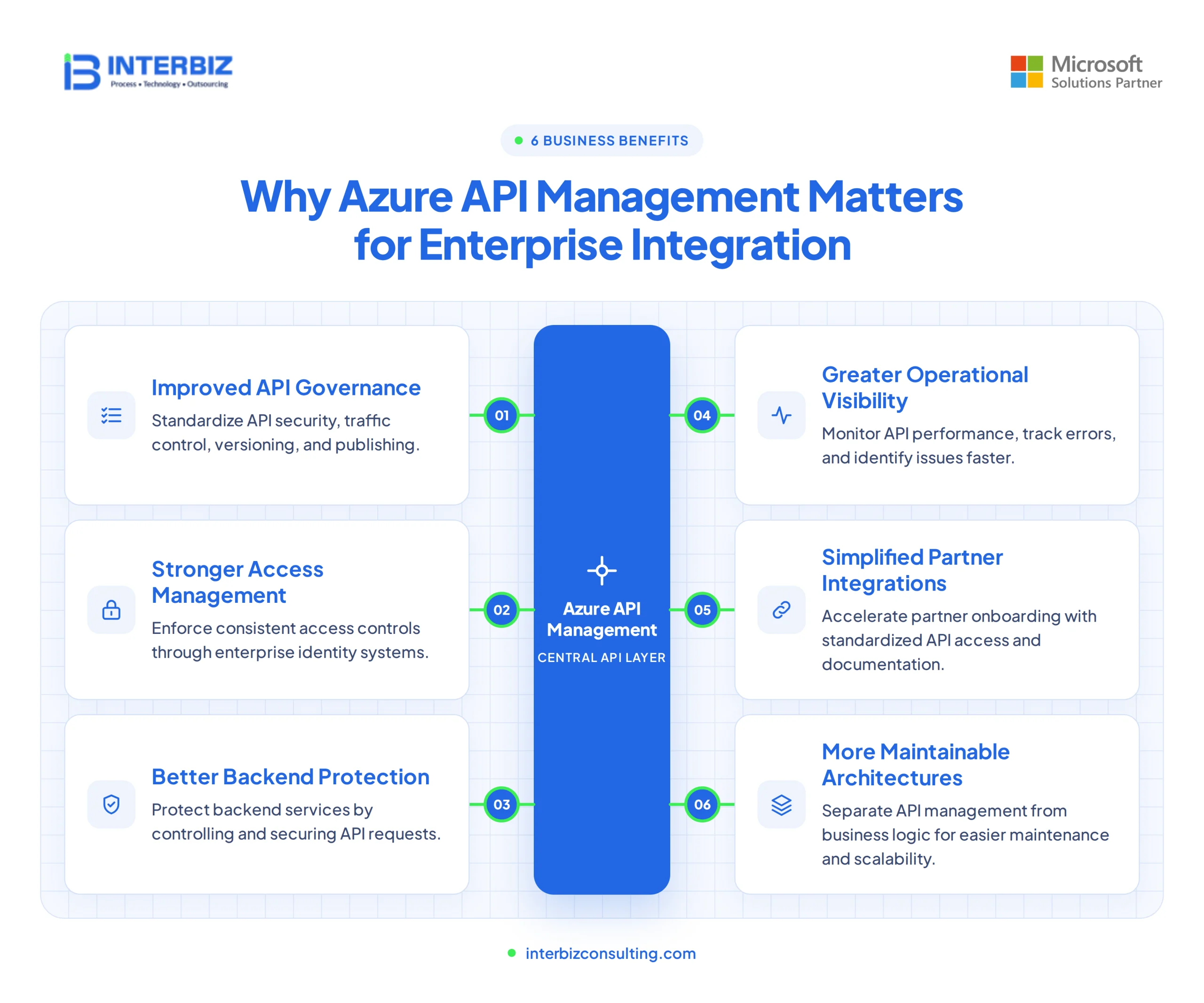 Its key benefits include:
Improved API governance: Apply shared standards for authentication, traffic control, versioning, and API publication.
Stronger access management: Centralize gateway level checks and integrate with enterprise identity systems.
Better backend protection: Reduce direct exposure of backend endpoints and control the requests forwarded to them.
Greater operational visibility: Collect diagnostic information and identify API performance issues.
Simplified partner integrations: Provide standardized API access and documentation for authorized external consumers.
More maintainable architectures: Separate gateway level concerns from core business logic, making API management easier to maintain as systems evolve.
The actual benefits depend on the architecture, policy design, monitoring configuration, and operational practices used during implementation.